In October 2025, Microsoft ended support for Windows 10. Even with a year of ESU, individuals are about five months from the end. For businesses, $122 in October this year, $244 in October next year, and the door closes the following October.
Hundreds of millions of PCs worldwide are flagged as "not compatible with Windows 11." CPUs older than 8th gen, no TPM 2.0 — by Microsoft's standard, "no longer usable."
For anyone who owns one of these "can't-upgrade-to-Windows-11" PCs, the answer of this article is clear-cut: you should absolutely migrate to Linux (Debian). ESU is finite and expensive, buying a new PC is — as the next sections show — the worst possible timing, and Linux is free with the existing hardware untouched. There is, in practical terms, no other road to choose. The rest of this article is about how to carry out that "should."
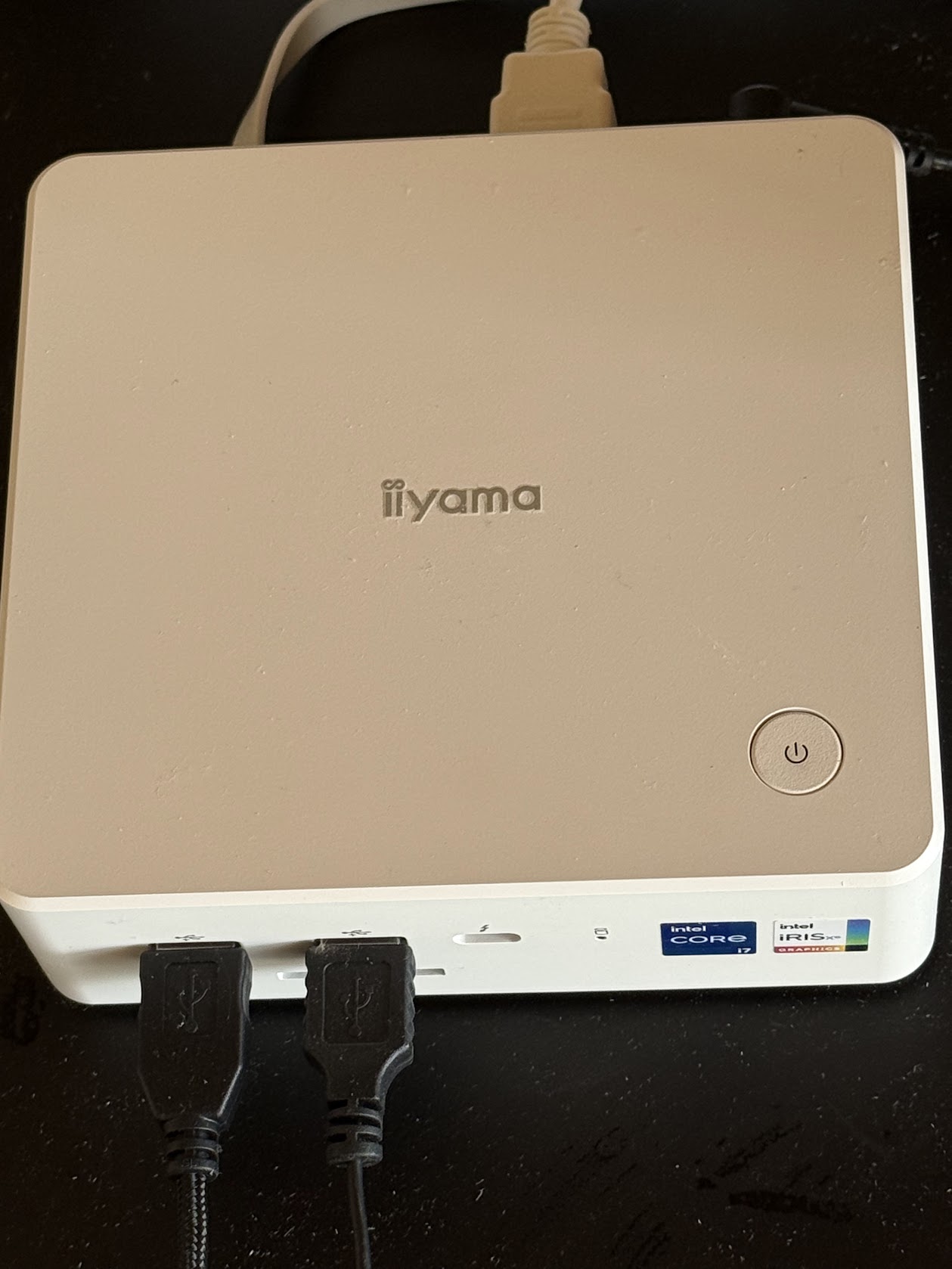
2026 is the worst possible timing to buy a new PC. The AI bubble that Microsoft itself helped trigger has driven up memory and storage prices significantly. On top of that, the 2026 Iran war and its oil shock are likely to push prices higher still. One concrete number: the same mini PC model used for the hardware verification in this post has gone up by ¥60,000 (about $400) within less than a year since purchase. And the Copilot+ PCs Microsoft recommends now routinely run over ¥300,000 (about $2,000).
What is Microsoft Doing?
Lined up, Microsoft's strategy is structurally identical to the medieval enclosure of the commons.
- Chop off the bottom. Windows 11 hardware requirements (TPM 2.0, 8th-gen CPU or later) declared hundreds of millions of working PCs "no longer usable" on paper. Copilot+ then set a new floor at NPU 40 TOPS.
- Drain the middle. The AI bubble Microsoft itself stoked has pushed memory and SSD prices up, and the entry-level 16 GB / 500 GB tier is vanishing from shelves.
- Push only the top. ¥300,000+ Copilot+ PCs are sold as "the next standard," with Copilot subscriptions and a Microsoft account chained to them.
Demolish the commons — working second-hand and entry-level PCs — and leave only the lord's designated, expensive plots: the same playbook as medieval enclosure. But every enclosure has an exit. What Microsoft can enclose is "Windows users," not "PC users." The hardware itself comes along to Linux untouched.
Copilot+ PCs ship with an NPU (a processor dedicated to AI work), but for now this does not change the fact that AI processing remains centralized in data centers. Copilot's core features — drafting in Word, formula generation in Excel, summarization in PowerPoint, reply drafts in Outlook, agents — are still processed in Azure's cloud. What the NPU runs locally is a narrow set of peripheral features: Recall, Studio Effects, parts of live captions. Despite the "AI on the edge" marketing, dependence on the Azure data centers — the actual core of the AI bubble — does not decrease.
And even after paying that much, you have no guarantee how many years a Copilot+ PC will keep running smoothly. In particular, on Snapdragon (ARM) Copilot+ PCs, installing Linux is currently very hard — the combination of bootloader, firmware, and GPU drivers leaves the community still in trial-and-error territory.
Considering all of this, the best move right now is to not buy a new PC. And in that case, Linux is the option.
Debian as the choice
Linux has many distributions, but Debian — maintained by volunteers across the world for over 30 years — is one of the strongest candidates. It is structurally insulated from commercial vendor decisions to drop support.
Hardware that ran Windows 10 will, in most cases, run Debian 13 without issue.
Real-hardware verification — the basis for this post
Here is the actual machine I installed Debian 13 on and tested. I bought it last year to develop Windows applications — but I've decided to stop making Windows apps.
| Component | Model | On Debian 13 |
|---|---|---|
| Motherboard | MouseComputer ISoDEi-I1MA (mini PC) | UEFI / TPM 2.0 left enabled |
| GPU | Intel Iris Xe Graphics (integrated) | Works out of the box on Mesa, no extra driver |
| Wi-Fi | Intel Wi-Fi 6E AX211 160MHz | firmware-iwlwifi bundled in netinst — SSID list shows up right in the installer |
| Bluetooth | Intel | Same iwlwifi package |
| Wired LAN | Realtek 2.5GbE + GbE (dual NIC) | Standard r8169 |
| Storage | NVMe Kingston OM8TAP4512 (512 GB) | Standard nvme driver |
| Audio | Realtek HD + Intel SST | snd-hda-intel / sof-firmware |
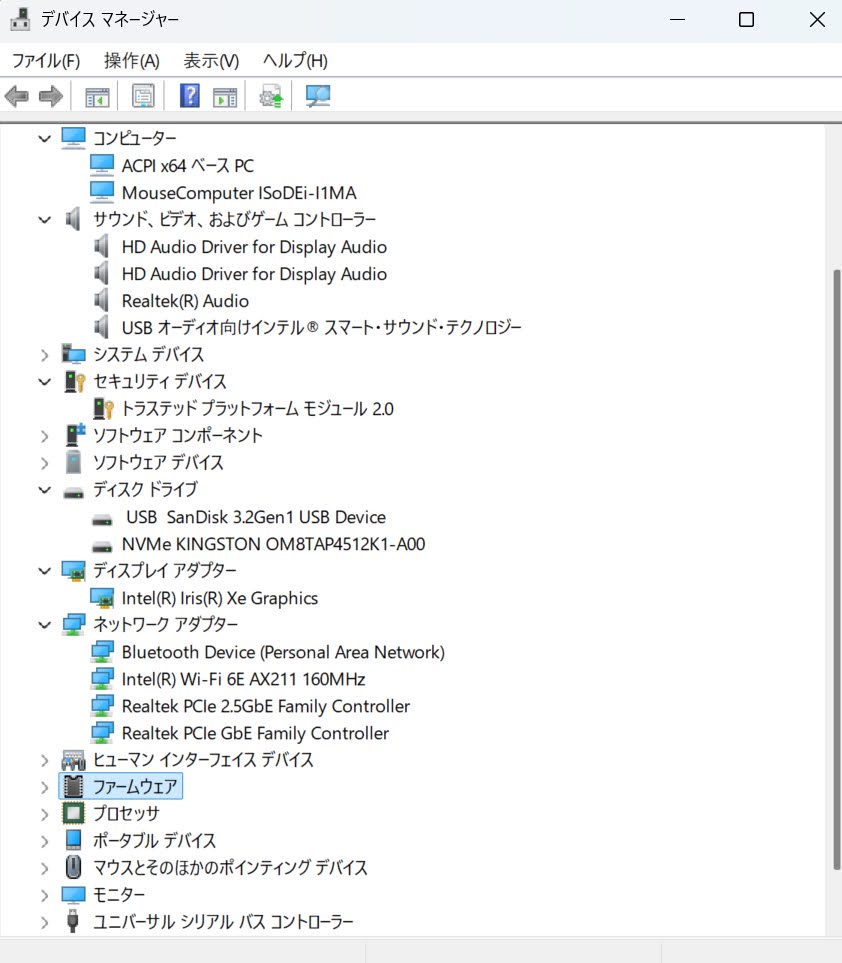
Of the seven trouble categories Chapter 8 of Learning Debian with Claude lists (display, Wi-Fi, Bluetooth, audio, suspend, Japanese input, peripherals), none of them required any work on this machine — all worked from first boot. And because you skip every Windows 11 setup chore (Microsoft account requirement, Copilot opt-in, OneDrive push, the wall of consent dialogs), the Debian 13 install was, if anything, faster than the Windows 11 setup that came on the same hardware.
"Linux is hard" reversed in the AI era
The reputation that Linux is hard runs deep. The black screen with commands, the unfamiliar vocabulary, the lack of Windows-style click-through interfaces — all of that was true when humans had to memorize everything alone.
But in 2026, two structural shifts have reversed the situation.
First — GUI operations and settings are harder for AI
It might sound counterintuitive, but for AI like Claude, teaching you how to operate or configure something through a GUI is much harder than teaching it through commands.
GUIs are structurally difficult to describe in words. "Third item from the top of the left menu in Settings" changes between versions. "Click the gear icon" depends on where it sits on screen. Even with a screenshot, AI can only point at roughly the right area. The deeper the settings hierarchy, the higher the cost of handing the steps to a human. Windows's deep settings, in particular, are exactly the kind of place AI has trouble guiding you through in words.
Commands are different. They live entirely in text. Claude — the most widely used AI in enterprise — writes the command, you copy and paste, and it runs as-is. If an error comes up, you paste the error text back to Claude and it can locate the cause.
Linux's "too many commands" weakness flipped into a strength once AI sits beside you. And at the same time, Windows's "everything completes in the GUI" strength flipped into a weakness in the AI era.
Second — Flathub, the Linux app store
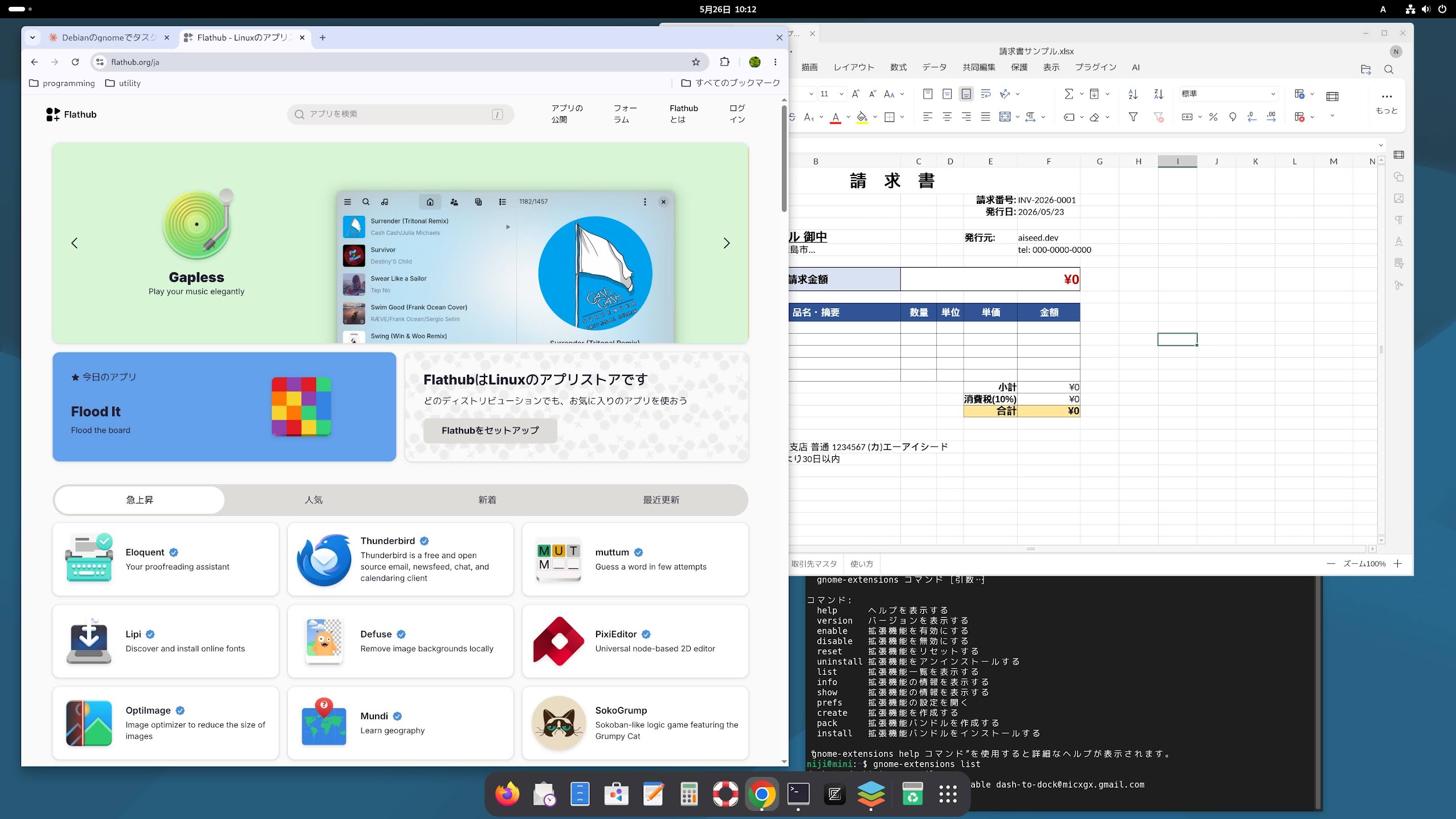
The second shift is that Flathub, the Linux app store, has matured. Installing everyday apps now works just like on a smartphone. Open flathub.org and the apps that run on Linux are gathered in one place.
| Category | Apps |
|---|---|
| Browsers | Firefox, Google Chrome, Chromium, Brave |
| Office | ONLYOFFICE Desktop Editors, LibreOffice |
| Communication | Zoom, Slack, Discord, Element, Signal |
| Media | Spotify, VLC, Audacity, OBS Studio |
| Creative | GIMP, Inkscape, Krita, Blender, darktable |
| Development | Zed, VSCodium, Visual Studio Code, PyCharm, IntelliJ IDEA, Android Studio |
| Utility | Bitwarden, Joplin, Obsidian, Thunderbird |
On the office side, Learning Debian with Claude puts ONLYOFFICE at the center, with LibreOffice as a backup. ONLYOFFICE has high visual fidelity to MS Office and can open and return .docx / .xlsx / .pptx files as-is — while your own work shifts to Markdown and Python. That is the book's stance.
There is hardly anything left that you can't find an app for. And if you ever do get stuck, we now live in an era where AI (Claude) can build the tool for you — so there is little to worry about.
Flathub is like the Microsoft Store. But it is better in several ways. The Microsoft Store does not carry Google Chrome — Microsoft favors its own Edge and excludes competing browsers. And while you're looking for an app, irrelevant paid apps often push in as "recommendations."
So modern Linux is two-layered:
- Everyday apps: install via Flathub's GUI. No commands needed.
- Configuration and development: operate via commands. This is exactly where AI shines.
These two layers are what make Linux strong in the AI era. Windows is in the awkward middle on both — its GUI doesn't reach deep settings, and PowerShell commands are awkward even for AI to handle.
Learning with Claude
This site has two textbooks for learning with Claude beside you.
Learning Debian with Claude is a prologue-plus-23-chapter textbook for migrating to Debian through dialogue with Claude. What to tell Claude, how to pull environment information, how to hand it logs, what to try when you're stuck — these are less about Linux knowledge per se and more about the discipline of learning with AI.
AI-Native Software Development covers what to do after you arrive in Debian. Excel VBA into Python, Word into Markdown, CSV into JSON / SQLite — the toolkit for an era when AI is your colleague.
Once you internalize this discipline, it becomes the foundation not just for Debian, but for anything you'll learn or build alongside AI from here on.
Now is the Time
"Debian + AI + Flathub all came together — and now is exactly when it's a good fit." Three years ago this would have been different. Linux commands were hard, Flathub's catalog was thinner, and AI wasn't there. The three came together in 2026 — now.
Related: Windows is Breaking Down — How Nadella has given up on Windows
Related: Japan's Windows Disaster Risk — Social impact of synchronized end of support